1
Open the Genfactu app and sign in
Open the Genfactu app and sign in to your account.
Your account is deleted from the Genfactu app. This page is for information only.
Account deletion is permanent. Save any information or documents you may need before confirming.
Follow these steps from the Genfactu mobile application.
Open the Genfactu app and sign in to your account.
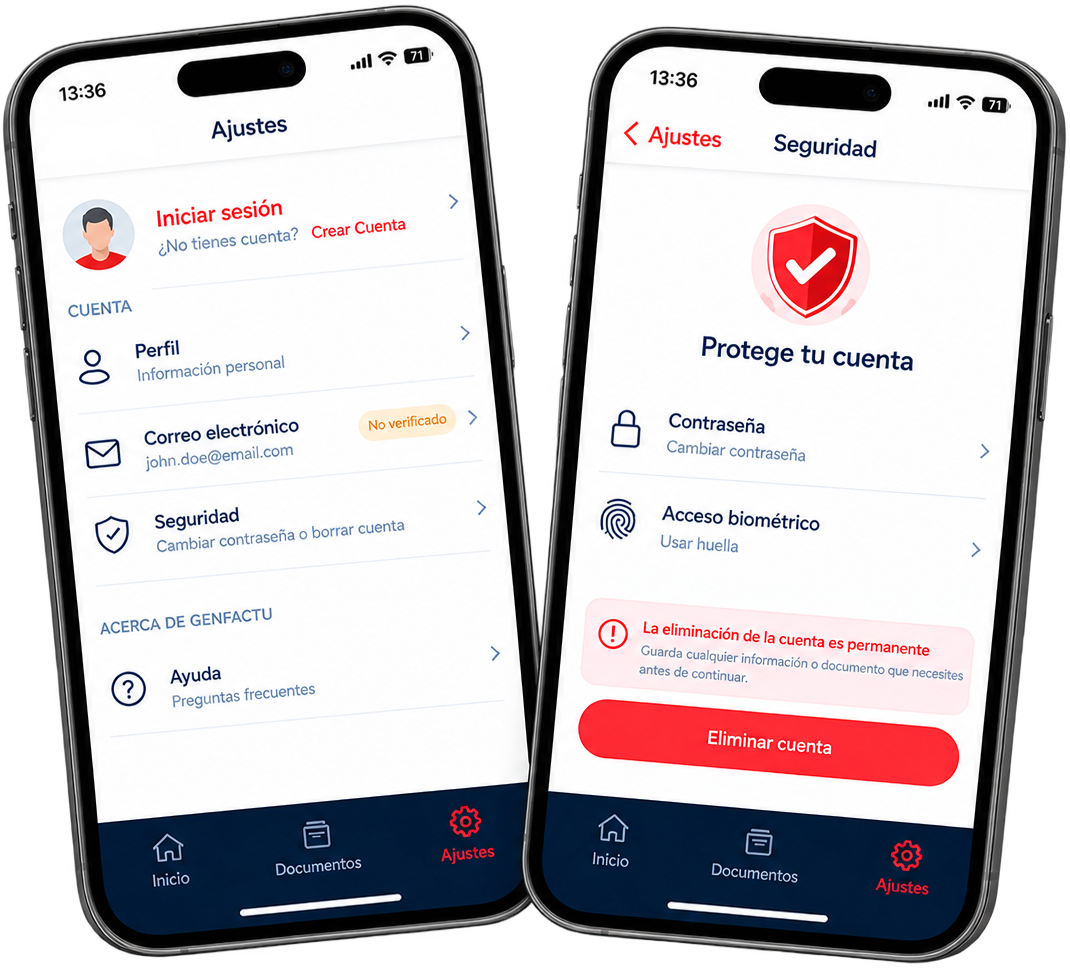
Tap the Settings tab in the app navigation.
In Settings, tap Security to access your account security options.
Tap Delete account and follow the on-screen instructions to confirm the deletion of your account.
Account deletion is available from the Security section of the mobile application.
This website does not delete your account or your data. The deletion request must be completed from the Genfactu mobile app.
Account deletion is permanent. Save any information or documents you may need before confirming.
Save your invoices, quotes and other important documents
Make sure you do not have information you still need
An active subscription should be cancelled before account removal
Your account data may be permanently deleted and cannot be recovered